
The product manager reads the ticket out loud: “Let customers pause their subscription for up to three months.” It sounds like a two-day change. Then the senior engineer who built the billing system starts listing what it touches. The nightly renewal cron job. The dunning job that retries failed cards. The weekly “stuck subscriptions” sweeper. The cancellation queue consumer and the invoice queue consumer, each with its own retry and dead-letter handling. And the subscription_status enum, which now has 14 values, three of which nobody can define with confidence.
The estimate comes back at three sprints. Nobody argues, because everyone in the room has seen what happens when someone changes one of those cron jobs without understanding the other three.
If that sounds familiar, the problem is not your engineers. It is the system they inherited.
How a simple cron job becomes a business process
Nobody designs a homegrown orchestration platform on purpose. It accumulates.
It starts with one cron job that renews subscriptions at midnight. A payment provider times out, so someone adds a retry, then a queue, then a dead-letter queue and a script someone runs by hand to replay it. Records get stuck halfway, so a sweeper job is added to find rows where status = ‘PROCESSING’ and updated_at is more than an hour old. Each step is a reasonable local fix.
The root cause is that the business process itself has no home. “Renew a subscription” is a sequence of steps with waits, retries, branches and compensation. In a cron-and-queue system that sequence is never written down in one place. It is implied by schedules, consumers, status values and timestamps, and understanding it means reconstructing it from five codebases and a stale wiki page.
The same symptoms show up in billing runs, onboarding, data syncs and newer AI enrichment pipelines that call slow, flaky model APIs: long-running, multi-step work held together by polling and state flags.
Why the usual workarounds stop working
Teams in this position usually try a few things before considering a structural change.
Better documentation. Someone draws the flow diagram. It helps for a quarter, then drifts, because the diagram is not the code.
More monitoring. Alerts on queue depth tell you that something is stuck, but not which customer is stuck at which step.
A dedicated owner. The one person who understands the system becomes the escalation path for every incident, until they go on vacation, burn out, or leave.
A rewrite into a bigger state machine. Some teams consolidate status columns into one carefully designed state table. This is better, but you are still writing your own timers, retry bookkeeping and recovery logic. You have built a workflow engine; you just have not admitted it yet.
None of these address the core issue: process state, timing and failure handling are spread across infrastructure instead of expressed as one durable piece of logic.
Signals that it is time to migrate
Not every cron job needs replacing; a nightly report export is fine as one. The signals that matter concern multi-step business processes with real consequences when they fail halfway.
- Simple feature requests to an existing process get estimated in sprints, not days.
- A status enum or status column has grown past the point where the team can list every legal transition from memory.
- You have at least one “sweeper” or “reconciler” job whose purpose is to fix records the other jobs left behind.
- Incident response for a process depends on one or two specific people.
- Support cannot answer “where is this order (or customer) in the process?” without an engineer running SQL.
- Replaying a dead-letter message is considered risky because nobody is sure it is idempotent.
- On-call pages cluster around the same handful of jobs and consumers.
If three or more of these are true for a single process, that process is a strong migration candidate.
The cost of staying put
The cost rarely appears as a line item, which is why it is easy to ignore. It shows up as lead time on features that touch the process, as on-call hours spent unsticking records, as incidents where customers were double-charged or never onboarded, and as key-person risk. It also shows up in every estimate’s “we have to be careful” buffer.
What durable workflows replace
The general approach is durable execution: you write the business process as ordinary code, and a workflow engine persists its progress after every step. If the process crashes, it resumes from the last completed step instead of starting over or getting stuck. Several open-source and commercial engines implement this idea.
Mapped onto a typical homegrown setup, a durable workflow replaces:
- Status columns and enums. The workflow’s recorded history is the state. You can query a running instance’s status directly, rather than inferring it from a flag scattered across tables.
- Sweeper jobs. A crashed process resumes on its own, so there is far less to sweep; permanent failures surface as failed workflow instances instead of orphaned rows.
- Hand-rolled retry handlers. Retries with backoff are declared per step as policy, not implemented in every consumer.
- Cron-based timers. “Wait 30 days, then resume the subscription” becomes a durable timer inside the workflow, not a nightly query looking for rows whose date has passed.
- Ad hoc compensation. If step four fails, the workflow can explicitly undo steps one through three (the saga pattern) in the same file that describes the forward path.
The “pause subscription” feature becomes a branch in one workflow: receive a pause event, wait for a timer or a resume event, whichever comes first, then continue renewing.
Implementing it without a big-bang rewrite
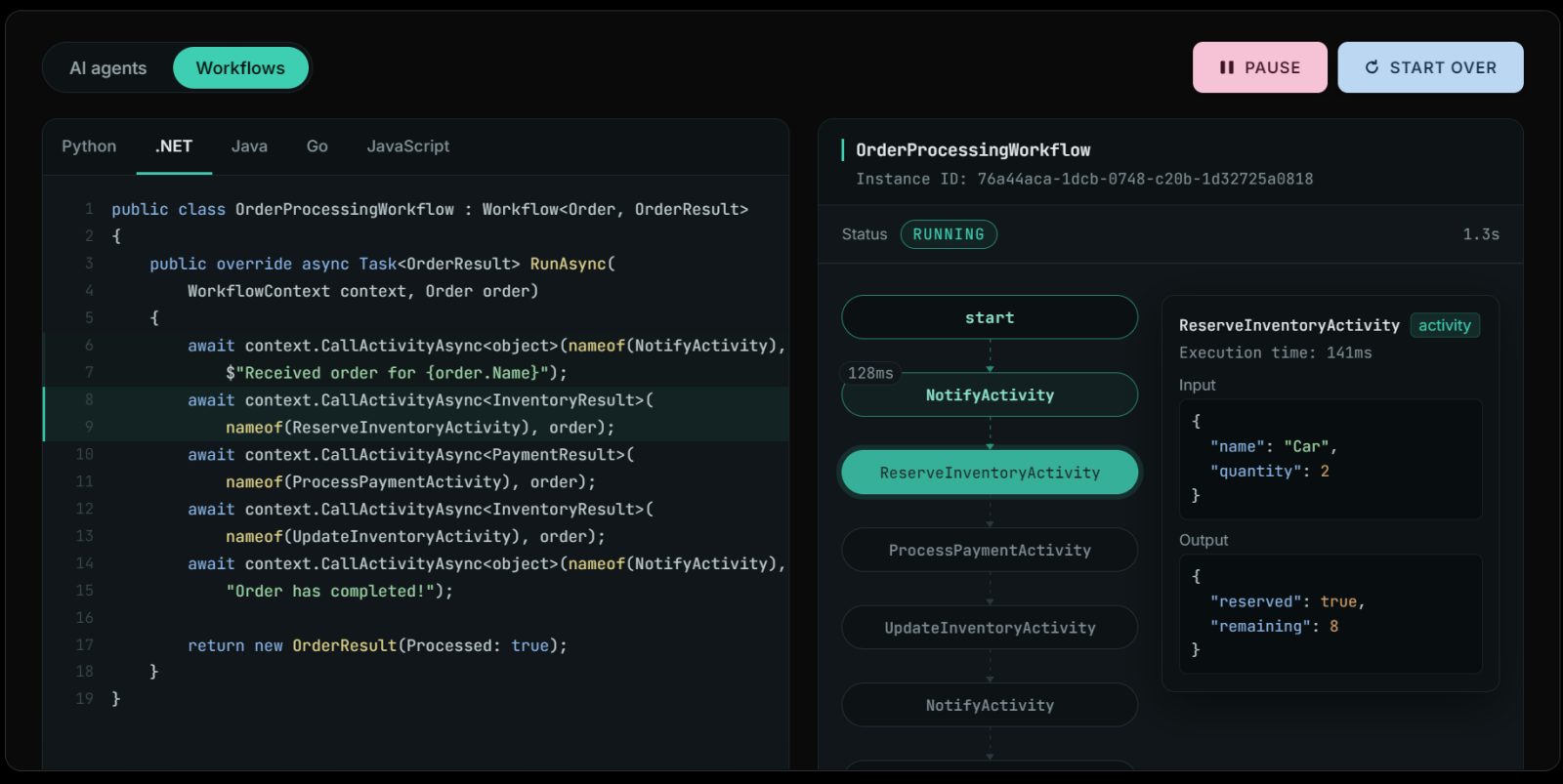
One practical open-source option is Dapr Workflow, part of Dapr, a CNCF graduated project licensed under Apache 2.0. Workflows are written as code with SDKs for .NET, Java, Python, Go and JavaScript. Workflow history is event-sourced into a pluggable state store, which can be a database your team already runs, such as PostgreSQL. After a crash, the workflow replays its history and continues; completed activities are not re-executed. It supports the patterns this kind of migration needs: chaining, fan-out/fan-in, child workflows, durable timers, external events for things like human approval, and compensation. Workflow versioning is also available.
There are two constraints worth briefing your team on. Orchestrator code must be deterministic, so all I/O (database writes, payment calls, emails) belongs in activities. And durable execution does not make side effects magically idempotent; your activities still need idempotency keys where an external system could see a call twice.
This does not mean ripping out your queues. Queues and pub/sub remain the right tool for distributing events between services, and Dapr’s pub/sub building block works with brokers such as Kafka, RabbitMQ and Redis. The change is that a queue message starts or signals a workflow, rather than being the only record that a process exists.
If your team would rather not operate the runtime itself, managed options exist. Diagrid, from the team that created Dapr, is one company that offers managed durable workflows and commercial support for open-source Dapr. As with any vendor, validate claims against your own workload and failure scenarios before committing.
A low-risk migration roadmap
The safest path is a strangler pattern, applied one process at a time.
- Pick one process. Choose one that scores high on the signals list but is not your most critical revenue path.
- Write down the real process. Reconstruct the steps, waits, retries and compensations from the existing jobs. This alone often surfaces bugs.
- Build the workflow alongside. Implement it as a durable workflow, reusing existing service calls as activities. Keep the queues that feed it.
- Shadow and compare. Run the new workflow on a slice of traffic, or in a mode where it records decisions without acting, and compare outcomes against the legacy path.
- Cut over gradually. Route new instances to the workflow. Let in-flight legacy instances drain through the old jobs.
- Delete the old machinery. Remove the sweeper, the retired cron entries, and the status values nobody uses anymore. Otherwise you maintain two systems.
- Measure, then pick the next process.
Making the case to leadership
Leadership does not fund “better architecture.” It funds fewer incidents and faster delivery. Before you propose anything, collect a baseline for the target process over the last two or three quarters:
- ☐ Number of incidents and customer-facing failures traced to the process
- ☐ On-call hours spent on manual fixes, replays and sweeper failures
- ☐ Lead time for the last few features that touched the process
- ☐ Number of people who can safely change it
- ☐ Support tickets that required engineering to answer “where is this customer?”
Frame the first migration as a bounded experiment with a clear success metric, such as eliminating a specific sweeper job. One migration with real before-and-after numbers beats a platform proposal. Once one team has a working pattern for a durable workflow platform, whether self-run or managed, the second and third migrations get easier to justify and faster to deliver.
Conclusion
Cron jobs and queues are not the problem. The problem is using them as an implicit, undocumented workflow engine for processes that matter to the business. When a three-month pause feature costs three sprints, the system is telling you something. Pick one process, make it explicit and durable, measure the difference, and let the results decide what comes next.